Bypassing Microsoft Defender for Endpoint (MDE) with 9 year old UAC bypass technique (FODHelper.exe)
Updated: Mar 10

1. FOREWORD
When I started building the Threathunting Academy Evasion course, I spent quite a lot of time researching how MDA (Microsoft Defender AV) and MDE (Microsoft's EDR solution) detection actually works, and how to bypass their logic.
How exactly do they detect a malicious payload? How much of it is signatures, how much of it is heuristics, how much of it is machine learning? What are the main indicators they look at? How do they detect obfuscated payloads? How do they detect in-memory payloads?
As we deal with privilege escalation in that course, I wanted to cover the FODHelper UAC Bypass technique, which is a well-known UAC bypass technique that has been around for a while, but is still effective and widely used by attackers, however it gets detected by MDA and MDE, so I wanted to show how the detection works and how to bypass it - and then again how to detect it 😃.
note : If you already understand how UAC works and how the FODHelper.exe technique works, you can skip directly to the 1.3.1 section where we explain how exactly it works and where we escalate privileges while bypassing MDA and MDE with this technique.
1.1 WHAT IS UAC?
User Account Control (UAC) is a security feature in Windows that helps prevent unauthorized changes to the operating system.
It prompts users for permission or an administrator password before allowing actions that could potentially affect the system.
UAC helps mitigate the impact of malware and unauthorized software by limiting the privileges of applications and users.

It basically ensures that even if a user is logged in with administrative privileges, applications they run do not automatically have those privileges, reducing the risk of malicious software gaining full control of the system. Its integrity level is set to medium, which means it can run with standard user privileges, but not with administrative privileges.
Note: UAC is not a security boundary, it is a user interface boundary, it can be bypassed by attackers to gain elevated privileges without user interaction.
Obviously, attackers like to have high privileges on the system, as it allows them perform more post exploitation (e.g. installing services, scheduled tasks, reading credentials from memory, installing drivers...) and have more control over the system, so they often look for ways to bypass UAC and execute their payloads with elevated privileges.
1.2 Enter FodHelper.exe
Fodhelper can actually execute with elevated privileges without triggering a UAC prompt. This is because it is a trusted Windows component that is allowed to run with elevated privileges by default.
So you basically get proxy execution of your payload with elevated privileges without any user interaction. This is a common technique used by attackers to bypass UAC and execute malicious code with elevated privileges.
1.3 How to use FODHelper.exe for UAC Bypass?
The FodHelper UAC bypass was first publicly disclosed in 2017 (GitHub) and has been used in various attack scenarios since then. To use FodHelper.exe for UAC bypass, you can follow these steps:
Create a registry key at HKEY_CURRENT_USER\Software\Classes\ms-settings\shell\open\command
Set the default value of this key to the path of your payload (e.g., C:\path\to\your\payload.exe)
Set the DelegateExecute value to an empty string
Run fodhelper.exe from the command line or by double-clicking it in the File Explorer
When you run fodhelper.exe, it will look for the registry key you created and execute the payload specified in the default value with elevated privileges, bypassing UAC.

powershell fodhelper bypass without AV (MDA)
Microsoft typically doesn't patch this vulnerability because it is a design flaw in how Windows handles certain trusted components and their interactions with the registry. However, both Microsoft Defender Antivirus (MDA) and Microsoft Defender for Endpoint (MDE) detect this technique so let's see how the detection works and how we can bypass it.

powershell fodhelper bypass with AV (MDA) enabled
1.3.1 Antivirus (MDA) : Detection and bypass of FODHelper.exe UAC Bypass
The powershell script gets detected by the following IOC's in MDA:
Registry key creation/modification: The script creates a registry key at HKEY_CURRENT_USER\Software\Classes\ms-settings\shell\open\command, which is a known indicator of the FODHelper UAC bypass technique. MDA can detect this registry key creation and flag it as suspicious.
MDA/MDE use a specific rule that looks for the creation (this is the achilles heel!) of this registry key and checks if the default value contains a path to following windows executables (call it a blacklist), which is a strong indicator of this technique being used.
BLACKLIST
# | Executable | Notes |
1 | cmd.exe | Command Prompt |
2 | powershell.exe | Windows PowerShell |
3 | cscript.exe | Console Script Host |
4 | wscript.exe | Windows Script Host |
5 | mshta.exe | HTML Application Host |
6 | schtasks.exe | Task Scheduler |
7 | reg.exe | Registry Console Tool |
8 | regedit.exe | Registry Editor |
9 | rundll32.exe | Run DLL Host |
10 | regsvr32.exe | Register Server |
11 | pcalua.exe | Program Compatibility Assistant |
12 | python.exe | Python Interpreter |
13 | pythonw.exe | Python (windowless) |
14 | pwsh.exe | PowerShell Core |
15 | conhost.exe[0-16] --headless | Console Host (headless) |
16 | dummy.exe | For testing purposes |
Execution of fodhelper.exe: When the script runs fodhelper.exe, MDA can detect the execution of this trusted Windows component in an unusual context (i.e., without user interaction and with a modified registry key, command line arguments), which can also trigger an alert.
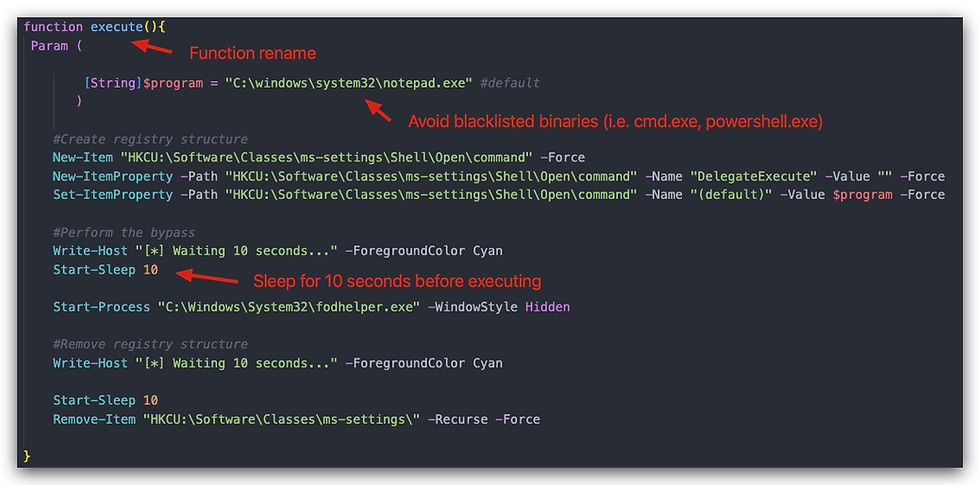
The name of the function "FodHelperBypass" in our .ps1 script, we'll simply rename it to "execute".
Timing and behavior analysis: MDA also analyzes the timing and behavior of the script, such as the sequence of actions (registry modification followed by execution of a trusted component), which further contributes to its detection. We'll add a sleep of 10 seconds between the registry modification and process start.
The detection logic looks like this:

So after modifying our orignal FodhelperBypass.ps1 script we get this:
Below a screenshot of running ". .\FodHelperBypass_NG;execute", which will spawn a notepad with elevated privileges. If you provide your own payload, make sure it's not on the blacklist!!!

This bypasses Microsoft Antivirus (MDA) completely, however MDE still manages to detect and block this.
1.3.2 EDR (Microsoft Defender MDE) : Detection and bypass of FODHelper.exe UAC Bypass
For the MDE implementation of the bypass we'll use csharp (.net) and here we're going to implement avoiding the registry key creation by splitting it up into two steps:
Create a random temporary key in the registry (e.g., HKEY_CURRENT_USER\Software\Classes\tmp12345\shell\open\command\), and set the default value to the path of the payload and the DelegateExecute value to an empty string.
Rename the temporary registry key to HKEY_CURRENT_USER\Software\Classes\ms-settings\shell\open\command just before executing fodhelper.exe.
By simply doing this, we can try do confuse the MDE detection logic, as it will not see the creation of the ms-settings registry key with a suspicious value — only a rename, which doesn't trigger the same creation event.
For additional evasion we'll implement "indirect syscalls" - the explanation of those can be found in the github repo.
And finally, signing our payload - you can use SignatureKid or Carbon copy - or any other tool that allows "cloning of certs". The certificate will not be valid, but just it presence allows us to bypass MDR completely, when combined with the other techniques

For more detailed technical information check out the github repository found at the end of this article.
1.4 Demo
In the video below, we demonstrate the FODHelper UAC bypass technique but we're using actual Cobaltstrike beacon payloads instead of a dummy payload, as the code is csharp, we can easily load the beacon in memory and execute it without writing it to disk.
On disk we have an evasive shellcode loader that is responsible for loading the beacon and executing it in memory. So we demonstrate not only the UAC Bypass technique, but also how to execute a payload in memory without writing it to disk, which is another important aspect of evasion and bypassing detection (we cover this in more details in the Threathunting Academy Evasion course).
And yes we have a payload on disk (Our Evasive Shellcode Loader) but it is not in the blacklist, and it is not a known malicious executable.
CLICK ON THE YOUTUBE VIDEO BELOW TO SEE THE DEMO

1.5 Adding an new detection rule to MDE
By looking at the creation/modification of that registry key and checking if the data contains any of the blacklisted paths is a good way to detect this technique (it stops a lot of LOLBin proxy execution and in-memory powershell stuff), but it is also a very generic rule that can easily be bypassed by attackers as we have shown above
So how could we still detect this?
We could simply look for processes that are running with "elevated privileges" and have a parent process of fodhelper.exe, as this is also a strong indicator of this technique being used.
A better rule could be to look for the execution of fodhelper.exe where it has any childprocess at all, as it is not normal for fodhelper.exe to spawn child processes, and it is a strong indicator of this technique being used.
DeviceProcessEvents
| where InitiatingProcessFileName == "fodhelper.exe"| project
    Timestamp,
    DeviceName,
    AccountName,
    FileName,
    InitiatingProcessFileName,
    ProcessId
The results of this query in MDE Advanced Hunting:

Bottom Line
This article shows how to think as an attacker and understand the detection mechanisms of security solutions like MDA and MDE, and how to bypass them. It also highlights the importance of understanding the underlying techniques and not just relying on tools, as well as the need for continuous learning and adaptation in the field of cybersecurity.
Augmenting your detection capabilities with a deep understanding of attack techniques and how to bypass them is crucial for effective threat hunting and incident response. By learning how attackers operate and how to evade detection, you can better protect your organization and stay one step ahead of potential threats.
This is exactly what we cover in the Threathunting Academy Evasion course, where we go deep into the techniques and tools used by attackers, and how to analyze and respond to them.
Don't ASSUME that a technique is detected just because it is well-known, always test it yourself and understand how the detection works and how to bypass it.
Source Code and POC (Github Repository): FODHelperUACBypass-NG
DISCLAIMER
This tool is intended for educational purposes only. It should not be used for any malicious activities or unauthorized access to systems. The author is not responsible for any damage or harm caused by the use of this tool. Always ensure you have proper authorization before using this tool on any system.
Threathunting Academy Evasion course is designed to teach security professionals how to understand and analyze attack techniques, and how to bypass detection mechanisms. It is not intended for malicious use, but rather for educational purposes to improve the skills of security professionals in defending against threats.
Comments